
Buying guide · Window cleaning
Window cleaning software
Keep customers, repeat visits and invoices in sync when rain changes the route.
Start with Squeegee if recurring rounds drive your schedule. Start with Jobber if the same crew also quotes and invoices one-off work. If you work alone and your calendar stays manageable, keep it and use your existing invoice tool.
By BizOpsPick · Evidence and prices checked . How we evaluated the tools

Affiliate disclosure: BizOpsPick may earn a commission if you purchase through its Jobber link. Read our disclosure.
The buying decision
Rain moves Monday’s route. What else moves?
Our example crew cleans three storefronts every Monday. Rain moves the round to Wednesday. The owner must keep next Monday intact, notify customers about Wednesday, and invoice each completed stop once. A separate residential booking needs a confirmed access time. That last detail matters because a fixed-time stop can be handled differently from a flexible route visit.
- Rainout. Hold the three Monday stops.
- Makeup round. Assign the visits and tell each customer.
- Normal round. Keep next Monday on the calendar.
Jobber
Follow the job from quote to invoice
Jobber is a practical starting point if a window cleaning business mixes routine visits with one-off work that starts with a quote. In a window-cleaning discussion, one respondent reported using it for estimates, crew assignments, scheduling and invoicing. That makes shared access worth testing in the same account, especially if an owner and a worker both need to see the schedule. Operator discussion · BOP’s Jobber review
Move the visit, then check the message. Jobber documents editing an individual recurring visit while leaving the rest of the series in place. Its New Schedule can move or reassign multiple appointments. The individual move can prompt you to send a rescheduling email or text, and reminders for the old time are canceled. The individual notification prompt is absent on bulk reassignments. Plan a separate notice step for the group until you have verified how your account handles it. Visit and notification behavior · New Schedule and route documentation
Know what the plan buys. Core is a one-user starting configuration with basic quoting, scheduling and invoicing. Jobber lists automated reminders and QuickBooks Online sync on Connect. In the New Schedule, route optimization is a web-admin action on Connect, Grow and Plus for anytime visits. Keep a firm 7 a.m. access appointment visible and check where it fits around the optimized stops. Jobber plan matrix · BOP’s Jobber pricing and seat guide
Squeegee
Move a visit while keeping the round
Squeegee distinguishes the frequency attached to a job from the frequency attached to a scheduled round. For a job-level repeat, the explicit Replan action gives you a choice: keep the future dates or shift them to preserve the interval. Quick moves use the account’s default. A scheduled-round appointment can be moved on its own in the planner. To change the underlying round schedule, use the Rounds view. Official replanning rules · Watch Squeegee’s actual multi-planner
Check the day the worker sees, and the notice the customer receives. Verify the default contact method, delivered reminder and makeup date in the paid tier you are considering. Squeegee documents both automatic generation and manual invoices that combine jobs. If a storefront group wants one monthly invoice, inspect what lands in the draft before turning on any automation. Notifications · Invoicing walkthrough
Confirm the routing, multi-planner, worker access and messaging features in the tier offered to you. Squeegee’s public prices are in GBP, with each login charged at the chosen plan’s per-user rate. US checkout pricing and US message costs are unverified. If accounting matters, review its QuickBooks and Xero reporting exports with your bookkeeper. Plan comparison · Seat rules · Reporting exports

A moved stop still needs the right invoice
The three fictional storefront stops are $30, $45 and $50. If each is billed per completed visit, the makeup round totals $125. At $45 a visit, the middle storefront owes $180 for four completed visits or $225 for five. A fixed $180 monthly agreement can remain $180 in either month if the contract says so. These are example amounts before tax and fees.
Jobber documents per-visit and fixed-price recurring billing. Squeegee shows how to use manual invoices to group multiple jobs. On eligible Jobber Payments plans, an enabled automatic payment can charge a saved payment method when the invoice is generated. Account and job settings matter. Try moving a stop from the last day of one month into the next. Check the service date, billing period, billable quantity and whether any saved-card payment would be collected. Leave the invoice unsent while you check. Jobber recurring job billing · Jobber automatic payments · Squeegee invoice settings
Subscription math
Price the plan your crew would actually use
Count the owner, scheduler and field workers who need separate access. Compare a named team configuration and billing commitment. Jobber’s annual prepay and one-year commitment billed monthly are different offers. Squeegee charges for each named user. Jobber documents one optional extra seat on Core. For more than two Core users, check the Connect configuration and ask for the exact price of any extra seats. Jobber seat rules
| Configuration | Month to month | Annual prepay |
|---|---|---|
| Jobber Core · 1 user | $49 | $348 |
| Jobber Connect · 1 user | $139 | $1,188 |
| Jobber Connect · 5 included users | $199 | $1,788 |
| Squeegee Core · 1 user | £19 | £190 |
| Squeegee Advanced · 1 user | £25 | £250 |
| Squeegee Ultimate · 1 user | £33 | £330 |
| The Customer Factor · flat subscription | $44.95 | $449.50 |
If the table is wider than your screen, swipe it sideways or focus it and use the arrow keys. Jobber prices are standard US rates. Squeegee rates are the vendor’s published GBP figures before VAT. These figures exclude temporary offers, taxes, messaging, processing and migration costs. Jobber · Squeegee · The Customer Factor
Three logins, two pricing models
Jobber’s displayed five-user Connect configuration covers three logins at 12 × US$149 = US$1,788 paid annually. Three Squeegee Advanced logins are 3 × £250 = £750 paid annually, or 3 × £25 = £75 month to month. The figures are in different currencies and describe different plans. Confirm the plan, region and currency before comparing the cost of equivalent work.
Jobber advertises a 14-day trial without a card. Squeegee advertises 30 days without a card. Check the terms shown during your enrollment and confirm renewal and cancellation before subscribing. Jobber trial FAQ · Jobber cancellation · Squeegee trial FAQ · Squeegee terms
Who should buy, and who can wait?
- Solo and a manageable route
- Keep a calendar and your invoicing tool while you can reliably track reminders and payments. One Reddit operator reported running their schedule on a phone calendar with estimates, invoices and payments handled through Square. Original discussion
- Recurring specialist rounds
- Start with Squeegee. Bring a scheduled round and an individually repeating residential job to the same demo. Confirm which future dates keep their weekday after a one-off change.
- Small crew adding quotes and one-offs
- Start with Jobber. Have one person move a visit and another verify it in their own view. Compare the cost of the least expensive tier that supports your required logins and notifications.
- Several logins, limited budget
- Shortlist The Customer Factor. It lists unlimited employees and subusers at its advertised flat rate. Ask to see the recurring schedule and invoice workflow before paying. It asks for payment at signup and states a 30-day refund period. Seat policy · Checkout terms
For a business that also cleans offices or homes, compare the broader cleaning business software hub and cleaning CRM guide. Before moving, compare two sample customer records across both systems: addresses, repeat frequency, open invoices and balances. A customer import is only one part of that handoff. Squeegee import documentation
Window cleaning software FAQ
What software should a small window-cleaning business try first?
Try Squeegee if recurring rounds are the bottleneck. Try Jobber if the office and crew need to link estimates, routes and invoices. Compare The Customer Factor when several users need access on a tight budget.
Can window cleaning software automatically move jobs when it rains?
The workflows documented here require a person to move or replan the visits. For a bulk move, verify future visits and check which customers are told about the changed time.
Will moving a recurring job change the next visit?
Jobber documents individual visit edits that leave the rest of the series in place. In Squeegee, check whether the repeat is defined on the job or on the scheduled round. For a job-level repeat, Replan can keep the pattern or update it.
Does a customer automatically get a new time?
Jobber documents a prompt after an individual move and omits it on bulk reassignments. In Squeegee, check the contact method and reminder rules in your plan. If you need a customer to confirm access, treat confirmation as a separate step.
How do crews bill weekly storefront visits?
Use per-visit billing if the charge follows work completed. Use a fixed or grouped invoice if your contract calls for it. Reconcile the makeup visit to the correct month before sending, particularly when it crosses a billing cutoff.
When is a calendar enough for one cleaner?
Keep it while you can reliably track recurring appointments, customer confirmations and unpaid invoices. Put a dollar figure on the extra admin. Four changes at 15 minutes each cost $30 a month at a hypothetical labor rate of $30 an hour.
How we evaluated these tools
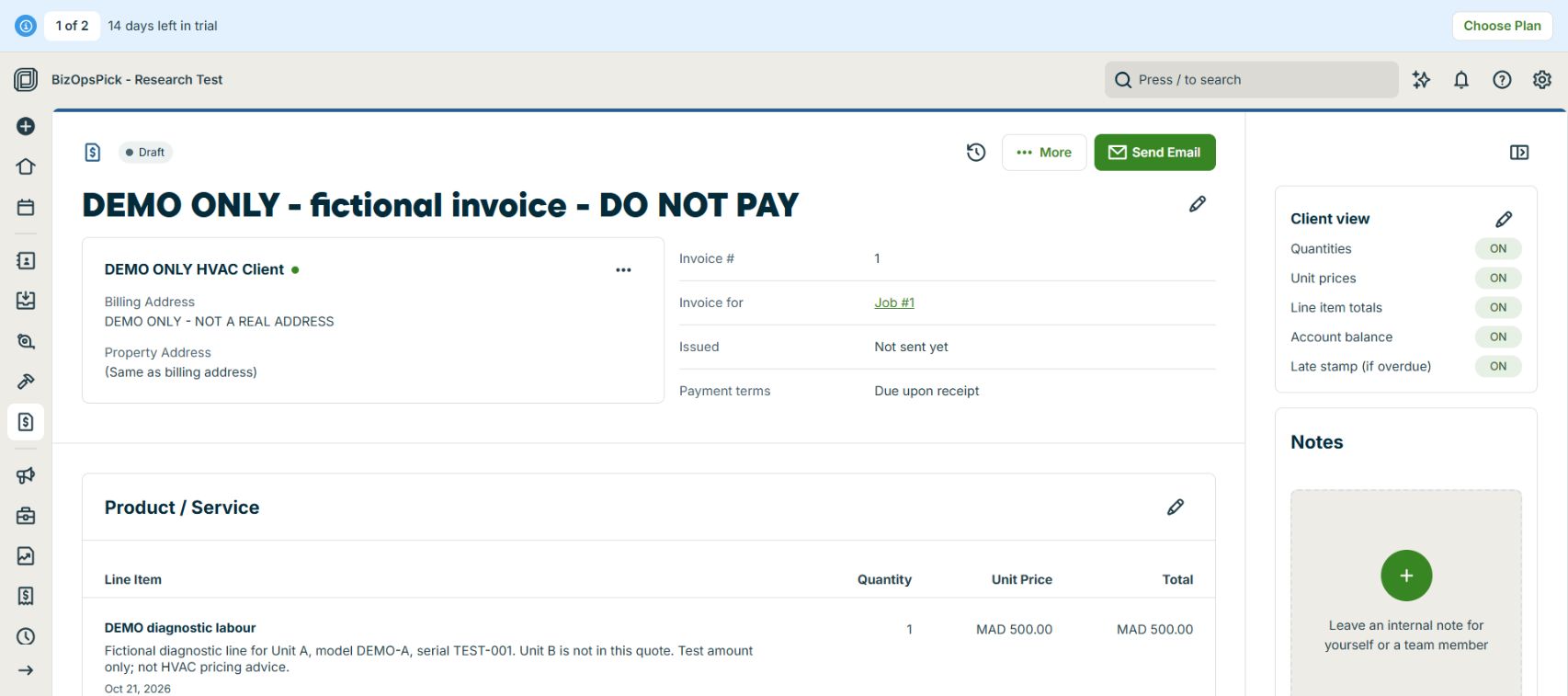
BizOpsPick checked public pricing, help articles and vendor walkthroughs on November 19, 2026. We used a fictional mixed route to show the decisions buyers need to verify. The Jobber image comes from a separate October desktop test with one fictional service visit. BOP did not run this route in either product. Operator posts are individual experiences and inform the demo questions rather than the feature claims. The storefront and facade photos illustrate the work.